CodeSnips

Tuesday, July 10, 2018

License "Agreements"

Wouldn't the world be a little bit better if companies like Google, Facebook, Amazon, Apple, and eBay made their "click to accept" 150 page "License Agreements" to read as follows:
1. This is how we intend to screw you: (blah blah)
2. We made these changes so we can screw you as follows: (blah blah)
3. If you realize you have been screwed, there's really not much you can do except give us exclusive ownership of all the data we've been collecting on you during that time, and, go screw yourself.
4. If there is a dispute regarding the kind and quality of the screwing you have heretofore agreed to accept from us, in perpetuity, as part of this agreement, which you have read, and completely understand, during the 30 seconds we've given you to read it, then you agree to accept arbitration, at your expense, in a venue of our choice, somewhere in Outer Mongolia, whereupon you will be screwed by an army of our lawyers, at your expense, for our pleasure.
5. Thank you for enjoying our "service." May it be long, pleasurable, and prosperous - for us...
It would make things much easier to understand.

Friday, December 4, 2015

Recursion examples in Python

"To iterate is human to recurse is divine"
- unknown programmer

In mathematics, the function is how we turn one thing into another thing. More essentially than that, we define functions to "map" one thing to another thing.  One of the more surprising features of functions is they can create other functions as an output - including themselves. This is the essential nature of recursion.

For example. If I want a function that returns the sum of (1 + 2 + 3 + ... n) numbers, I can define it as follows:

SumOfNumbers ( n )  
{   
     If n is equal to 1, the output is 1, otherwise the output is n + SumOfNumbers(n-1).
}

This is a recursive definition because the function refers to itself in its definition. The key part of the definition is that there is a single case for a specific input that does not refer to itself - but returns a value - allowing the function to escape from an infinite regress of definition. In the "SumOfNumbers" case, this is the output when given "1" as the input.  

One thing you'll notice as you work through the solution of SumOfNumbers(4) is you have to keep four intermediate answers before you can combine them into the final output:

SumOfNumbers(4) = 4 + SumOfNumbers(3)
SumOfNumbers(3) = 3 + SumOfNumbers(2)
SumOfNumbers(2) = 2 + SumOfNumbers(1)
SumOfNumbers(1) = 1

In a computer, storing each intermediate function result requires memory. So, recursive functions (assuming your computer language of choice supports recursive function definitions) can take longer to solve and may be limited by available memory to solve large inputs ( try SumOfNumbers(1000) on paper...) 

Let's look at another recursive function example - generating Fibonacci numbers.

The following code expresses the implementation of a function which returns the "nth" number in the Fibonacci sequence. Note how it  reads: the nth fibonacci number is the sum of the two previous fibonacci numbers (the first 2 numbers are always "1"):

def fibo(n):
    if n <= 2:
        return 1
    return fibo(n-1) + fibo(n-2)

This function runs just fine in Python up until you enter something like fibo(300) - at which point you will notice that Python is not optimizing this function as it will explode and set your computer on fire.

If the last statement in a recursive function is a call to itself (as it does in the above example) then it is possible to optimize the function by doing a "tail" recursive optimization. Some languages can detect a tail recursive definition and automatically optimize it. Python doesn't do this.

You can optimize it yourself by passing along extra parameters to carry the intermediate results into the next nested call.  This essentially turns the recursion into an iteration. Here's the tail recursive version:

def fibotail(n):
    def fibohelp(i,j,n):
        return fibohelp(j,i+j,n-1) if n>0 else j
    return fibohelp(0,1,n)


I'm taking advantage here of Python's ability to define nested functions. Fibotail calls its fibohelp function recursively - note the extra parameters to carry along the two previous results in the call.

To tell you the absolute truth, every time I write this code, I have to read it twice. I do not find it all intuitive. It is recursive, it is succinct code, and it will work efficiently on very large inputs. So it is optimized, but I would argue it's not worth the time to write it this way - as it loses the primary benefit of writing recursive function definitions: they can make certain algorithms easier to express and understand.

If your language of choice doesn't support automatic tail recursion optimization I'd recommend falling back on iteration to express your algorithm. I'd argue the following code at least captures the essence of the algorithm even if it is less brief and succinct.

def fiboloop(n):
    firstfibo = 1
    secondfibo = 1
    nextfibo = 1
    
    for x in range(1,n-1):
        nextfibo = firstfibo + secondfibo
        firstfibo = secondfibo
        secondfibo = nextfibo

    return nextfibo

As always, these are often matters of taste. however, if you are using a functional language that doesn't support loops and does not automatically optimize tail-recursive function definitions, then you'll possibly need to know how to write a hand-optimized tail-recursive code.

Wednesday, December 2, 2015

JGrasp - quick example 1

JGrasp is a tool similar to Linqpad to execute and explore code snippets. Here's a simple example of some Java code that shows the difference between static and instance class attributes. You should be able to past this code into JGrasp, save as Example1.java, and run/debug it.

public class Example1 {

  public static void main(String[] args) {
    
    System.out.println("Hello, World!!!\n");
        
    Square sq1 = new Square("My Square");
    Square sq2 = new Square("My Other Square"); 
        
    String line1 = 
      String.format("Squares have %d sides.\n", Square.Sides);

    String line2 = String.format("sq1 name is %s.", sq1.Name);
        
    System.out.println(line1+line2);
        
    System.out.println(String.format("sq2 name is \"%s\"",
        sq2.Name));
  }

}

class Square
{
  public static int Sides;
  public String Name;
    
  // Static initializer runs as part of class declaration.
  static {
    Sides = 4;
  }
    
  // Constructor - runs when instance is created by "new"
  public Square(String name)
  {
    Name = name;
  }
        
}


Sunday, September 20, 2015

WPF Simple Canvas Drawing

I'm brushing up on 3D mathematics and I find it useful (indeed necessary)  to write small bits of code to help understand and visualize the material. I even had a bit of fun writing a few programs in BASIC on a C64 that's part of my vintage computer collection.

Still, having modern tools, it's generally more useful to write graphic programs for more modern displays.  I whipped up the following code to display the results of a parametric circle equation. The tool of choice in this case was LinqPad. I like Linqpad because it's nice for writing and running short code snippets.

I think for many programmers WPF (Windows Presentation Framework) seems to be a complex tool, but, surprisingly, it's relatively simple to whip up simple interfaces using only code.  For this I decided to use the Canvas, Line, and Ellipse shape primitives to create a quick graphic display like this:.
void Main()
{
 var g = new Grid();
 var w = new Window { Width = 420, Height = 440, 
                             Title = "Graph", Content = g};
 var c = new Canvas { Background = Brushes.BlanchedAlmond };

 DrawLine(200,10,200,390,c);
 DrawLine(10,200,390,200,c);
 
 for (int i=0; i<50; i++)
 {
     double t = (1.0 / 50.0) * (i);
  int x = (int) (Math.Cos( 2 * Math.PI * t) * 100) + 197;
  int y = (int) (Math.Sin( 2 * Math.PI * t) * 100) + 197;
  DrawPoint(x,y,c);
 }
 
 g.Children.Add(c);
    w.ShowDialog();
 
}

public void DrawPoint(int x, int y, Canvas c)
{
    var e = new Ellipse { Height = 6, Width = 6, 
                          Fill = Brushes.Blue, Stroke = Brushes.Black };
 Canvas.SetLeft(e,x);
 Canvas.SetTop(e,y);
 c.Children.Add(e);
}

public void DrawLine(int x1, int y1, int x2, int y2, Canvas c)
{
    var l = new Line{ X1 = x1, Y1 = y1, X2 = x2, Y2 = y2, 
                      Stroke = Brushes.Black, StrokeThickness = 1 };
 c.Children.Add(l);
}

Saturday, July 19, 2014

AngularJS Number Validator Directive

After some searching yielded a few hints and examples, none of which really worked all that well, I pieced this together. Hopefully others will find it useful.

This AngularJS directive validates numeric entry. It uses a regular expression to test whether the input matches the expected numeric format and set the validity state of the element.

How does this work?
The $parsers array is an array of functions which can test the value on the input element. They pass the value along to other parsers by returning the value.  I change the value by removing any commas so the returned numeric string can be used as a Number.

In the directive, I capture the value of the directive attribute and add a parser function and formatter function to the respective arrays passed in.

The $formatters array is an array of functions which can format the model value for display in the input element. I use the built-in "numberFilter" for this.


View/Run/Edit the example in Plunker


app.directive('isNumber', ['numberFilter',function(numberFilter){
    return{
        require:'ngModel',
        link: function(scope, elem, attrs, ctrl){
            var digits = attrs.isNumber.length===0 ? "2" : attrs.isNumber;
            ctrl.$parsers.unshift(checkForNumber);
            ctrl.$formatters.unshift(formatNumber);

            function checkForNumber(viewValue){

                // Checks for positive or negative decimal or integer number with or without thousand separators
                if (/^-{0,1}\d{1,3}(,\d{3})*\.{0,1}\d*$|^-{0,1}\d*\.{0,1}\d*$/.test(viewValue)) {
                    ctrl.$setValidity('isNumber',true);
                }
                else{
                    ctrl.$setValidity('isNumber', false);
                }
                return viewValue.replace(/,/g,'');
            }

            function formatNumber(viewValue) {
                return numberFilter(viewValue,digits);
            }
        }
    };
}]);

Sunday, July 13, 2014

MEAN Stack CRUD Example

I thought it would be useful to create a full example using the MEAN stack. I wanted to include most of the bells and whistles in this particular example so that it would serve as a useful reference for other more complex applications.

MEAN is an acronym which stands for "Mongo Express Angular Node", and I must say this stack lets you create some very mean (and lean) code. 

The source for the full example is angularExample on GitHub - the README.md tells you how to run it.

Points of interest

  • The 'seeddb' script shows how to run Mongo command and run a Javascript setup script which creates the database and seeds the Account and AccountType collections. It creates a unique index on the Accounts collection.
  • The app.js file in the project root folder has the setup for Express, it passes the configured express handler as a "module.exports = app" - which is used by the (bin/www) script to setup the server listener.
  • Client-side setup of Socket.IO can be found in (/public/views/layout.jade) last two lines. This creates a global "socket" variable for client-side javascript to use for sending/receiving events. 
  • The application uses Socket.IO to broadcast account update notifications to the client browsers using the application.  See the bin/www file on how server-side Socket.IO is plugged in - along with the event send/receive.
  • The AngularJS controller (/public/javascripts/app/accountController.js) has the Socket.IO client code which sends notifications after saving/deleting items, and listens for the broadcast event in order to refresh the account list.
  • The (/routes/index.js) file has all the route handlers for the REST "/api" routes and home page load.


Wednesday, February 12, 2014

LINQPad4 Command Line And Dapper Via Nuget Just For Fun

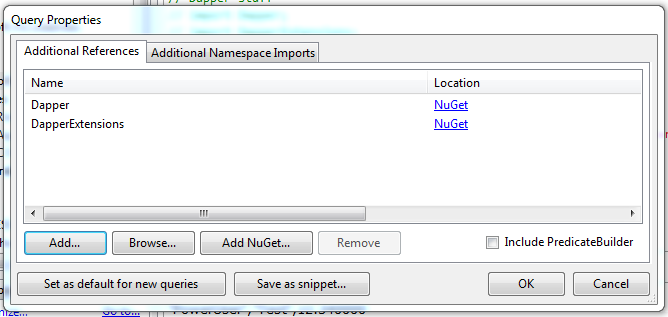
LINQPad4 recently added a command line runner "lprun.exe" which provides some very useful and fun things to do with LINQPAD scripts (or even code fragments).  I'll finish this post with an example, but first I was surprised to realize that you can, via the F4 command, reference Nuget packages in a linqpad script. For additional fun I thought I'd add references to Dapper and DapperExtensions, a nice "micro" ORM and helper extension methods that lets you do all sorts of useful things with databases.

Let's get started:

1. In LINQPad, hit F4 to bring up the references dialog and choose "Add Nuget..." under the "Additional References" tab.
2. Search (and add) "Dapper", then "DapperExtensions".
3. Under the "Additional Namespace Imports" tab, add "Dapper" and "DapperExtensions".


 You are now ready to do some Dapper things in LINQPad4. The logical question might be "why?" as we are able to do SQL linq stuff in LINQPad4 right out of the box. But, there are some useful things you can do in Dapper and there's no reason you can't mix the two things together. Plus, this is for play as much as for anything else. Let's have some fun.

This script gives a small example of how to obtain the connection string and do a little Dapper.  Note, it's interesting that you can do pretty much anything, such as DDL (commented out line), with Dapper - as opposed to linq for SQL. This simply creates some output.

// Dapper stuff
// import Dapper;
// import DapperExtensions;

var conn = new SqlConnection(Connection.ConnectionString);
var results = conn.Query("SELECT * FROM ROLES").ToList();

foreach (IDictionary r in results) {
    Console.WriteLine("\"{0}\",\"{1}\",{2}",
                      r["Rolename"],r["ApplicationName"],r["COUNT"]);
}

//conn.Execute("ALTER TABLE ROLES ADD COUNT DECIMAL (19,6)");

Now, you are able to run this script, using the new lprun.exe utility provided with LINQPad4, at the command line.


I'd recommend checking out the various options, especially the format options, available with this tool. For those who'd like to combine powershell scripting along with some database work, this could be a powerful, and yes, fun, way to do things.

Have fun!


Wednesday, September 18, 2013

Versioning REST web services in WebApi

Much has been written on the subject of the proper approach to versioning REST web services  If you google long enough, you find there are two basic approaches:

1. Put the version identifier on the URI somehow:
    http://myhost/Account
    http://myhost/v2/Account
    http://myhost/Account/?version=2.0
    http://myhostV2/Account

2. Use the HTTP headers: 'Accept', 'Content-Type', and/or 'X-mycustom' to pass the desired version from the client.
    Accept: application/myhost-v2+js
    Content-Type: application/myhost-v2+js
    X-Version: 2.0


Any scheme which requires a URI change seems like a bad idea to me. The URI is supposed to be, essentially, a coordinate to a specific entity. Adding version to the coordinate will break older clients immediately regardless of whether the entity has changed in a breaking way.

A more robust approach would allow clients and the web service to negotiate the version needed, but leave the URI the same. This is more compatible with the semantics of HTTP.

Specifically in the case where we are using Microsoft's WebApi to provide REST web services, I wanted to see if I could add version handling in the least obtrusive way for programmers, and to that end I wanted something that fit the following design goals:

Design Goals
1. The URI doesn't change.
2. Handling the logic to shape the entity based on version should be done within a single method (or class.)
3. I want to minimize any special handling in the ApiController.
4. I want to decouple my domain entities from my model entities.
5. I want to have zero configuration changes to make in IIS or my web.config.

I think the following solution meets each of the above goals.

Example Code

To avoid creating new content types, which would require me to alter my IIS config [goal 5], I've chosen to use a custom header: "X-Version". This allows me to leave my URI format alone [goal 1]

To minimize any special handling of this header in my ApiControllers [goal 3], I've created a base class from which my controllers will inherit. It sets a "Version" property on the controllers which inherit from this base class:

    public class BaseApiController : ApiController
    {
        public double Version { get; set; }

        protected override void Initialize(HttpControllerContext controllerContext)
        {
             base.Initialize(controllerContext);
             Version = 1.0;
             var versionHeader = 
                 Request.Headers.FirstOrDefault(h => h.Key == "X-Version");
             if (versionHeader.Value != null)
             {
                 double version;
                 if (double.TryParse(versionHeader.Value.ToList()[0],out version))
                 {
                     Version = version;
                 }
             }
        }
    }

    // Example usage
    public class AccountController : BaseApiController
    {
        IAccountRepo _accountRepo;

        public AccountController(IAccountRepo accountRepo)
        {
            _accountRepo = accountRepo;
        }

        public IEnumerable Get()
        {
            foreach (var acct in _accountRepo.getAll())
            {
                yield return acct.AccountMap(Version);
            }
        }

        public Account Get(int id)
        {
            return _accountRepo.getById(id).AccountMap(Version);
        }

        // We handle the other verbs (POST, PUT, etc.) similarly
        // with a mapping from Model to Domain.
   }


I want to send back a Version property on all my model entities so my client can confirm it is getting the right version of the model entities it requested.

    public abstract class ModelBase
    {
        public double Version { get; set; }
    }

    public class Account : ModelBase
    {
        public int Id { get; set; }
        public string AccountCode { get; set; }
        public string Name { get; set; }
        public string AccountName { get; set; }
        public bool IsActive { get; set; }
    }


To decouple my domain entities (in this case Account) [goal 4] from my model entities, I've chosen to implement a "mapper" as an extension method on my domain entity type. This extension method takes a version parameter so it can choose how to return the data. The mapper also updates the Version property. All my mapping logic goes into this method [goal 2] so I only have to make changes here if I create a new version of the model entity.


        // Note: this is the mapper from Domain to Model entity.
        // Same idea for the Model to Domain mapper would apply (not shown here)
        //
        public static Model.Account AccountMap(this Domain.Account acct,
                                               double version)
        {
            if (acct == null)
                return null;

            // Version 1 Account Model

            if (version == 1.0)
            {
                return new Account
                {
                    Version = version,
                    Id = acct.Id,
                    AccountCode = acct.AccountCode,
                    Name = acct.Name,
                    IsActive = acct.IsActive,
                    AccountName = null,               // not used in v1
                };
            }

            // Version 2 (Current) Account Model
            return new Account
            {
                Version = version,
                Id = acct.Id,
                AccountCode = "V2" + acct.AccountCode, // content
                Name = null,                           // deprecated
                IsActive = acct.IsActive,
                AccountName = acct.Name,               // new

            };
        }
    }


Version mapping. There are basically four kinds of changes: adding properties, renaming properties, deprecating properties, and changing the content of existing properties.

One drawback of the serialization of the C# model classes is they can't be dynamic (at least without a bunch of ugly work), so to avoid breaking changes, you have to leave old properties in place on the model classes. However, this isn't too bad and you're able to handle the various kinds of changes noted above and not break clients expecting the old versions. New version clients will not be cluttered with old properties either - so most of this mapping mess goes into a single set of mappers in the server code.

Summary

The work in this example creates a couple of small base classes and a version-aware mapping function. The base classes could easily be added to a common library for other applications to use.  The mapping function is an example of one way to transform models based on version - there are undoubtedly better approaches, but the end result is you can manage version changes to models in one place.

I've learned that to handle versioning in a clean way, it's important to design ahead of time and make sure allowances are made for future change in both client and server code. This particular approach meets the goals I set out.

Lastly, non-WebApi REST web service frameworks that are implemented in more dynamic, loosely typed, languages would have a bit easier time transforming the returned data based on version. In my case, I wanted to use as much of C# and WebApi out-of-the-box as possible (I guess this is the implied design "goal 6"), but I think any solution should probably address the first 5 goals above.

Monday, September 16, 2013

Intelligent Design - Irreducible Complexity

Not exactly a code posting, but I just can't believe that one of my favorite science shows - Through the Wormhole - hosted by Morgan Freeman, brought Michael Behe on the "Did God Create Evolution?" episode to present his alternative theory of intelligent design. First of all:  Behe's argument for "Irreducible Complexity" has been invalidated so many times, most recently in the Dover case, and by many other examples. But I'll set out the argument here very simply.

Behe claims that certain biological structures could not be the product of evolutionary ADDITION of changes because SUBTRACTING any of the constituent parts would result in a non-functional result. He often uses the bacterial flagellum as an example - essentially a "outboard motor" that certain bacteria use to propel themselves around.

 The problem with this argument is Behe makes the assumption that all evolutionary changes are ADDITIONS. In fact, many evolutionary changes are SUBTRACTIONS. I emphasize these terms in capital letters because it's so critical to understanding the misleading nature of his argument. It is clear that many "irreducible" structures can be created by the combination of incremental additions AND subtractions. Take the bridge structure. Here is a fully irreducible bridge:

 |===========|
XX           XX

This bridge cannot function if any part is removed. Right? So therefore, according to Behe, it must be designed because removing any part would make this bridge structure "non-functional".

But, in fact, let's assume we started with something like this:

 XX|==|==|==|XX

Some blocks have fallen (been added) between the two banks (XX), This could easily happen if blocks were dropped over the gap. It's a bridge. Not a very elegant bridge, but a bridge nonetheless - and one that could have formed naturally.

Now let's see what happens if a large block is added to this:

 |==========|
XX|==|==|==|XX

We still have a bridge - and again one that could easily have been formed by a natural process.

Now, lets SUBTRACT something (the underlying blocks) and behold the "irreducibly complex" structure of the bridge.

 |==========|
XX          XX

This process of addition AND subtraction happens incrementally in evolution all the time. Behe conveniently ignores this simple fact of incremental change. It is not all addition. It includes subtraction as well. This guy is supposed to be an expert biochemist -yet, he's NEVER seen examples of proteins being formed by addition and subtraction of molecules?!  Right. I think not. The man is shamelessly misleading people. 

So, here is a well-known answer to the so-called irreducible complexity argument. And yet, no mention was made in the Through the Wormhole episode of this, nor of the fact that such evidence was presented in the Dover trial in response to Behe's "theory".  It boggles my mind that Behe is given screen time presenting an argument that is so demonstrably weak.

Now go take a look at these structures and re-consider the Behe "theory" that functional structure must be designed by a "designer"
A "designed" bridge

OK. Off the soapbox now. Back to reality.


Thursday, September 5, 2013

Doing SignalR the AngularJS Way

I wanted to see how to use SignalR and AngularJS together, and worked up this example as an exercise. All my javascript code needs to be in a controller and I probably also want to encapsulate the SignalR stuff behind a service facade.

I'm assuming in this article you have some exposure to AngularJS and SignalR, so I won't get into the nitty gritty details on how to wire everything up in Visual Studio. If you are interested in the full example code, you can find it here on GitHub.

I will be interacting with this trivial SignalR Hub class:
public class NotesHub : Hub
{
    public void AddNote(string note)
    {
        Clients.All.noteAdded(note);
    }
}
This class exposes an 'AddNote' method and sends a 'noteAdded' message.

Now for the AngularJS code. I make sure that I include the jQuery module as part of my module setup, because I will be injecting that as a dependency to my service.
var mainApp = angular.module('mainApp', ['ui.bootstrap']);
mainApp.value('$', $);


now for the service code. Explanation follows below:
mainApp.factory('noteService', ['$','$rootScope',
 function($,$rootScope) {
  var proxy;
  var connection;
  return {
    connect: function () {
      connection = $.hubConnection();
      proxy = connection.createHubProxy('notesHub');
      connection.start();
      proxy.on('noteAdded', function (note) {
          $rootScope.$broadcast('noteAdded', note);
      });
    },
    isConnecting: function () {
       return connection.state === 0;
    },
    isConnected: function () {
       return connection.state === 1;
    },
    connectionState: function () {
       return connection.state;
       },
    addNote: function (note) {
       proxy.invoke('addNote', note);
    },
 }
}]);

First of all, you'll notice I am generating the proxy (line 8) for the SignalR hub explicitly. This is necessary to take control of when the proxy is created, and it replaces the need to have a <script src="signalr/hubs" type="text/javascript"></script> line on your main html page (or main layout page).
After starting the connection, (line 9), I setup an event handler on the 'noteAdded' message that the SignalR hub will emit. I use AngularJS $rootScope.$broadcast service to relay the event to any other controllers and/or services that may be interested in the event.
The service exposes 'addNote' as a facade over the proxy.invoke call for that method on the Hub class. The other functions exposed are convenience methods mainly so I can do some basic testing of this service (more on that later).

So, my controller ends up looking like this. Explanation of code follows:
mainApp.controller('mainController', 
function mainController ($scope, noteService) {
    noteService.connect();

    $scope.notes = [];

    $scope.$on('noteAdded', function (event, note) {
        $scope.notes.push(note);
        $scope.$apply();
    });

    $scope.addNote = function (note) {
        noteService.addNote(note);
        $scope.note = '';
    };
});

The noteworthy code here is in the $scope.$on handler for the 'noteAdded' event. Since we are handling a custom event, we need to explicitly call $scope.$apply() to insure any changes we've made to the scope are communicated through the DOM.
A word about testing
I use jasmine.js as well as Karma for my client-side Javascript testing. For my service test, I mainly wanted to make sure the various pieces needed to establish a connection were in place.
So, here's the example jasmine test:
/// <reference path="../apps/main/noteService.js" /&gt
/// <reference path="../jasmine.js" /&gt
'use strict';

describe('noteService Tests', function () {
    var noteSvc;

    beforeEach(module('mainApp'));
    beforeEach(inject(function (noteService) {
        noteSvc = noteService;
        noteSvc.connect();
    }));

    it('should attempt connection',function () {
        expect(noteSvc.isConnecting()).toBe(true);
    });

})

Friday, March 29, 2013

Arduino - Sending Serial Data

Playing with Arduino Uno board. The language for Arduino "sketches" is essentially java.

This script reads the value on analog pin 0 and write the value on the serial port every 150 milliseconds.


const int SENSOR = 0;
const int LED = 13;

int val = 0;

void setup()
{
  Serial.begin(9600);
  pinMode(LED,OUTPUT);
  digitalWrite(LED,LOW);
}

void loop()
{
  val = analogRead(SENSOR);
  Serial.println(val);
  delay(150);
}
You then just need a client that reads the data and displays it in some clever way. The companion language for clients for Arduino is "Processing" - a java library that makes it easy to write graphical clients. There is also a companion version - Processing.js - written by John Resig that cleverly compiles Processing code into Javascript so that programs written in this language can be displayed on web pages without the need for a java applet.
The following Processing script displays an eye graphic that changes pupil size based on the relative brightness of light sensed on the analog pin 0 (via a photoresistor).

// This sketch uses serial IO to communicate with the Arduino.
// The Arduino is writing out values from
// analog input 0 - which in this case has a photoresistor
// on it.
//
// The code auto-scales based on lowest and highest readings
// and draws a "pupil" in proportion to the amount of light
// sensed.
//
import processing.serial.*;

Serial myPort;
int minval=9999;
int maxval=0;
float r=0;
int a0;
PFont f;

void setup() {
  size(200, 200);
  myPort = new Serial(this,"/dev/cu.usbmodemfd121",9600);
  myPort.clear();
  f = createFont("Krungthep",20,true);
  smooth();
}

// Reads string between two delimiters in serial stream 
String readLine(Serial p,int firstDelim, int secondDelim) {
  StringBuilder sb = new StringBuilder();
  Boolean isFirstDelim = false;
  int c;
  while (true)
  {
    while ((c = p.read()) < 0);
    if (!isFirstDelim)
    {
      if (c != firstDelim)
        continue;
      isFirstDelim = true;
    }
    else
    if (c != secondDelim)
      sb.append((char)c);
    else
      break;
  }  
  return sb.toString();
}

void getReading()
{
  String line;
  if (myPort.available()>0) {
    line = readLine(myPort,10,13);
    if (line != null && line.length()>0)
      a0 = Integer.parseInt(line);
  }
}

void draw() {
  background(255);
  textFont(f);
  textAlign(CENTER);
  getReading();
  if (a0 < minval) minval = a0;
  if (a0 > maxval) maxval = a0;
  if (maxval==minval || abs(maxval-minval) <= 20)
      r=60;
  else
  {
      r = (float) abs(a0-minval) / (float) abs(maxval-minval);
      r *= 50;
      r += 10;
  }
    
  pushMatrix();
  translate(20,40);
  drawEye(r);
  popMatrix();
  
  fill(0,127,127);
  text("A0="+a0,width/2,height-25);
  
  if (mousePressed)
  {
    minval = 9999;
    maxval = 0;
  }
  
}

void drawEye(float pupilSize)
{
    int theta=0;
    pushStyle();
    stroke(0);
    noFill();
    bezier(0,40,30,-12,130,-12,160,40);
    bezier(0,40,30,92,130,92,160,40);
    pushMatrix();
    fill(#9B9DF7);
    ellipse(80,40,80,80);
    translate(80,40);
    for (int i=0;i<360;i+=(360/12))
    {
        rotate((2*PI)/12); 
        line(-40,0,40,0);
    }
    fill(0);
    ellipse(0,0,pupilSize,pupilSize);
    fill(255);
    ellipse(15,-15,8,8);
    popMatrix();
    popStyle();
}


Thursday, March 21, 2013

Javascript from C#, JInt, Jurrasic

Just a quick code snippet. I was interested in executing javascript from C#. So far, the two clear winners for a framework to do this are JInt and Jurrasic.  Needless to say, the V8 Javascript.Net project is dead and doesn't even try to pretend otherwise...
JScript .Net has been dead a long time - let's not even go there.

Jurassic takes a bit more effort to integrate existing .Net objects into scripts as parameters, but makes perhaps is faster.

JInt is the easiest to use and integrate (takes objects directly as parameters) - and for quick DSL-like scripting using Javascript - wins my vote.

using System;
using System.Collections.Generic;
using System.Linq;
using System.Text;
using System.Threading.Tasks;
using Jint;
using Jurassic;
using Newtonsoft.Json;

namespace RunJSInt
{
    public class Program
    {

        static void Main(string[] args)
        {
            JintExample();
            JurrasicExample();
            Console.ReadLine();
        }

        public class Developer
        {
            public string Name { get; set; }
            public string Title { get; set; }
        }

        public class DeveloperObjectInstance : Jurassic.Library.ObjectInstance
        {
            public DeveloperObjectInstance(ScriptEngine engine) : 
                base(engine)
            {

            }
            public void init(Developer dev)
            {
                this["Name"] = dev.Name;
                this["Title"] = dev.Title;
            }
        }

        private static void JurrasicExample()
        {
            var dev = new Developer { Name = "Mike", Title = "Developer" };
            var engine = new Jurassic.ScriptEngine();
            var obj = new DeveloperObjectInstance(engine);
            obj.init(dev);
            engine.Evaluate(@"function test(a) { 
                                  return 'Jurrasic says, hello ' + a.Name; 
                            }");
            Console.WriteLine(engine.CallGlobalFunction("test",obj));
        }


        static void JintExample()
        {
            var dev = new Developer { Name = "Mike", Title = "Developer" };
            JintEngine engine = new JintEngine();
            engine.SetParameter("message", dev);
            var result = engine.Run(@"
                return 'Jint says, hello ' + message.Name;");
            Console.WriteLine(result);
        }
    }
}

Sunday, September 30, 2012

OData with DataJS

If you've been rolling your own OData requests using jQuery, you might want to look at DataJS. It simplifies your code quite a bit and is really easy to use.

Here are examples of jQuery getJson and ajax methods:

// - Roll your own ajax (see OData version below)
$.ajax({
    type: "GET",
    url: "/OData.svc/PortfolioManagerGroups",
    headers: { "Accept" : "application/json",
               "MaxDataServiceVersion" : "2.0" },
    dataType: "json",
    success: listGroups,
    error: ajaxError
});


This is the DataJS vesion of the above jQuery.ajax() example
OData.read("/OData.svc/PortfolioManagerGroups", 
            listGroups, odataError);


This example shows how to do a JsonP formatted query in DataJS.

// I like to wrap this in a function
function readJsonp(qry, callback) {
    OData.defaultHttpClient.enableJsonpCallback = true;
    OData.read(qry, callback, odataError);
    OData.defaultHttpClient.enableJsonpCallback = false;
}

// A query would look like this. Callback should loop through data.results
var qry = "http://someplace.com/Accounts?$select=ACCT_CD,ACCT_NAME&$orderby=ACCT_CD";
readJsonp(qry, listAccounts);

Wednesday, September 26, 2012

Personal BI Tool - PowerPivot for Excel

On the continuing odyssey to discover new ways to leverage OData services, I finally loaded up PowerPivot on advice from one of my colleagues (ok - my boss) and can only say wow.

There are some rough edges, mostly due I think to the fact that I'm overtaxing my "workstation" (a VM running with 2Gig of ram and 1 CPU). However, even in this constrained environment I was able to run through the tutorial - which includes crunching numbers in 2+ million row sales fact table.

The tools here are based on running SQL 2012 in an embedded mode within Excel (no need to install SQL tools - just Excel 2010 and this free add-in). So you get a lot of tooling to import data and manipulate it, as well as do calculations on it.  This won't replace fullblown BI solutions, but it is pretty darn capable.

And, when you combine this with the ability to source data from databases, flat files, excel tables, AND OData (WCF Data Service) sources, this tool puts a lot of power in the hands of analysts.

PowerPivot download

PowerPivot Tutorial (highly recommended - takes about 2 hours to run through it)

Sourcing OData feeds into PowerPivot


Monday, September 24, 2012

WCF Data Service version 5 OData V3 Support

Finally, Entity Framework Code First DbContext is supported by the WCF Data Service, as well as additional features in the OData standard.  Version 5.0 download here

There a few steps you need to take to upgrade your WCF Data Service though. (details here)

Strangely, support for JSONP was left out of this new release. If you are using this workaround, as I am, it's a one line fix - change the Accept header fix-up to: application/json;odata=verbose

When you add a new WCF Data Service into a Visual Studio web project, you'll have to repeat the steps given above, unless you are willing to dig under the covers (I am not ;) and create an item template for the new version in Visual Studio.

A couple of other interesting links:
WCF Data Services Toolkit  - An OData framework for incorporating non-SQL (or more accurately non-Entity Framework) data sources into an OData service.

JayData - a linq-like javascript library that can use Odata. (uses DataJS under the covers)

Thursday, August 23, 2012

Playing with JsRender and JsFiddle.net

Here's an example:

Saturday, January 7, 2012

Machine Learning - Supervised Learning

Just finished a online extension course on Machine Learning via Stanford Engineering school. Excellent course.

Linear Regression

We learned about simple linear regression - fitting a line/curve to a 2D set of data points. This was then expanded to include 3 or more dimensions. This is useful for prediction and extrapolation where 2 or more variables (dimensions) represent correlated features (height and weight for example.) In a more complex scenario, we focused on predicting house prices base on various features such as square footage, number of rooms, number of floors, etc. Some important learning from this was the need to normalize/scale the features so they have similar ranges: Xs = (Xi-mean(X))/range(X).

Linear regression fits a straight line, but by applying increasing powers to each feature variable, (x1, x2^2, x3^3, etc), and passing the results into the gradient descent algorithm, you can fit a polynomial curve. Or take logarithms, roots, etc., to fit other types of curves.

The algorithm which finds the best fit is called gradient descent. We form a hypothesis formula to predict our desired outcome (in this case price): h(X) = p1*x1 + p2*x2 + p3*x3...
The trick is to find the values of the vector P (p1,p2,p3,...) which gives the best prediction. We determine how good/bad the prediction is by comparing the training data X with the predicted data Y in a cost function J = mean((X-Y)^2) - so the best fit would equate to the lowest cost function results.

Gradient descent uses the derivative of the cost function which calculates the rate of change of the cost function with respect to each parameter in P. p1 = p1 - a*derivative(J,p1)
'a' here is the learning parameter which decides how big a step along the cost curve to take. The parameter is updated. As it reaches the minmum point of the cost curve, the derivative essentially becomes 0 (zero slope), so it no longer changes. At this point, the parameter has been found for that minimum.

The algorithm converges then on the parameter values, which, when fed into the hypothesis equation above - should represent the best fit to the training data.

Logistic Regression

Linear regression is good for prediction of real valued numbers, but in many cases, we want to use a set of features to classify something true or false. For example, whether a tumor is malignant/benign or whether an email is spam or not. Linear regression does not reliably work in these cases because the resulting variable is integral (0 or 1 in these cases) - not a real number.

In this case we need a hypothesis function that examines variables bounded between 0 and 1. We use a "sigmoid" function to bound the values h(x) = 1 / (1 + e^(theta*x)) where "theta" is a parameter similar to linear regression. This function has values between 0 and 1 - essentially representing the probability that, given theta and x, the result y is true or false.

With this, we can create a cost function that compares the difference between the predicted values y and the training data. We calculate the derivative of this function and again use gradient descent to find the optimal parameters (thetas).

Neural Networks

Neural networks are a possibly much more efficient way to find the optimal parameters for a classification problem - such as the ones we solve with Logistic Regression. Especially ones with large number of classes. In logistic regression, our output classes are usually yes/no (k=2), or perhaps a prediction of the letter grades students will get based on certain habits they exhibit, a multi-class definition k>2 where k is less than 10.

Neural networks would extend to something like predicting letters in an alphabet based on the pixels (each one being a variable) in an image. This has a k=26 set of classes and for an image of 20*20 gray scale pixels, 400 variables (and thus 400 parameters to calculate).

Logistic regression would take a lot of time and would examine many non-optimal parameter values as it searched. Neural networks have been found to more quickly converge to optimal parameters by calculating the parameter values in stages (or "layers") that feed outputs from an input layer to one or more inner layers, that feed an output layer.

We're still working with a hypothesis function and cost function, and we use numerical method to minimize the cost function - which essentially is the neural network. The cost function uses the neural network algorithm to determine a cost, along with an array of gradients (derivatives) for each variable. These outputs are fed into the minimization function to calculate the optimal parameter weights for the neural network layers.

Once this "training" is completed, we have a set of weights for each layer of the network. The prediction calculation then boils down to a series of matrix multiplications for each layer to calculate the output values - which is very speedy.

In all the above cases, we use a training set of data with known inputs/outputs. The hypothesis function is written in a way that pairs each variable (feature) with a parameter that weights the variable in some way. The comparison between the known predictions and the hypothesized predictions is the "cost" function. In all cases, our goal is to minimize the difference or cost by choosing the best weights (parameters) to use in the hypothesis function.

Sunday, January 23, 2011

Getting Layout Dimensions in Android

It's always interesting to learn a new operating system or API, but it can often be a little frustrating. You never know when you're going to run into a couple of hours of head scratching. Often, it seems to be the simplest tasks - such as determining the height or width of an element you can plainly see rendered on the screen - that turn into hours of twiddling.

In Android, you attach a view tree to your Actitity in order to be able to interact with the UI.
Once this is done, you can get references to your widgets (views) using a call like this from your Activity:
TextView t = (TextView) findViewById(R.id.txtName);

Now, views all sport a method like this: t.getHeight()
Which, presumably returns the actual height of that view element. Problem is, this method invariably returns zero.

At first I thought it was because I was calling this during the onCreate() method in my activity class. Perhaps the layout wasn't fully calculated at this time. So I moved my code to the onResume() method. This method is called whenever the activity is entered or re-entered. But again, no luck. Strange, as the layout at this point should be fully ready to display. I think there's a bug here in Android (I'm at version 2.2 currently.)

Luckily, I accidentally hit the search button while running a test on my EVO and, lo and behold, the height values I was trying to report on a TextView in my layout suddenly had non-zero values in them. Obviously, some sort of layout process had been forced, and the state of the view tree had been updated.

How can I get notified when the layout is fully calculated? The short answer is to attached a listener for a callback when the layout is calculated. Here's what it looks like.

@Override
public void onCreate(Bundle savedInstanceState)
{
  super.onCreate(savedInstanceState);
  RelativeLayout vMain = (RelativeLayout)

     this.getLayoutInflater().inflate(R.layout.main, null);
  vMain.getViewTreeObserver().addOnGlobalLayoutListener(
  new ViewTreeObserver.OnGlobalLayoutListener() {
    public void onGlobalLayout() {
      DisplayLayoutDimensions();
    }
  });
  
setContentView(vMain);
}


public void DisplayLayoutDimensions()
{
  StringWriter sw = new StringWriter(1000);
  PrintWriter out = new PrintWriter(sw);
  TextView t = (TextView) findViewById(R.id.textview);
  ImageView img = (ImageView) findViewById(R.id.hp67);
  out.printf("\nImage Drawable\n");
  out.printf("ImageView Height dp: %d\n", img.getHeight());
  out.printf("ImageView Measured Height dp: %\n",
     img.getMeasuredHeight());
  t.setText(sw.toString());
}

Friday, January 21, 2011

Android image drawing

When the emulator is in programming mode (or a program is currently entered/loaded), I wanted to display a magnetic card image in the magnetic card holder slot in the same place it would go on the real HP67.

Problem: how to have the image be invisible when no program is loaded or being entered?

There is a setVisibility() method on the ImageView class, but I'm darned if I could get it to work. So, I adjusted the alpha instead, using the setAlpha() method, and this works beautifully.

Here's how I did it. This works, but right now it uses absolute margin offsets in the RelativeLayout view group. Later, I'm going to investigate how to make this more dynamic to the actual screen dimensions on the device.


  1. Place the card image file in the project's res\drawable folder. In my case, the card file is card.png.
  2. Add a tag to my main.xml layout - which is a RelativeLayout view group. Positioning the image where it should be displayed. The android:src attribute points to the image in the drawable folder. The id is assigned as well so we can get a reference to this view later:

    <RelativeLayout>
    ...
    <ImageView
    android:id="@+id/card"
    android:layout_alignParentLeft="true"
    android:layout_alignParentTop="true"
    android:layout_width="260dp"
    android:layout_height="50dp"
    android:layout_marginLeft="30dp"
    android:layout_marginTop="87dp"
    android:src="@drawable/card"
    />
    </RelativeLayout>
  3. In the activity class where this view is used, load the view. In my case, I want to have the image be initially invisible, so I set the alpha to zero immediately after setting the content view:

    _vMain = (RelativeLayout) this.getLayoutInflater().inflate(R.layout.main, null);
    setContentView(_vMain);
    ImageView card = (ImageView) findViewById(R.id.card);
    card.setAlpha(0);
  4. Later, when the user clicks the program-mode button, I have logic that reveals the card image like this:

    ImageView card = (ImageView) findViewById(R.id.card);
    card.setAlpha(255);

Sunday, January 9, 2011

Android windowBackground and Title hiding

To create a window without a window title, and including a custom window background - in this case an image:

1. Create a style in your strings.xml file under the res\values folder in your project:
<style name="hp67Background" parent="android:Theme">
<item name="android:windowBackground">@drawable/hp67</item>
<item name="android:windowNoTitle">true</item>
</style>

This style inherits from the android theme via the "parent" attribute. The background can be any drawable type, including, if desired a color code - such as #ff0000. In this case, I'm using a png image (hp67.png) saved under the res\drawable folder.

The android:windowNoTitle setting is set to true.

2. Edit your manifest XML file to include the style as a theme on the tag:

<application android:icon="@drawable/icon" android:label="@string/app_name" android:theme="@style/hp67Background">

This should do the trick!